




Dota 2 ESP Undetected: Complete Enemy Tracking Guide
- Introduction: Why Information Superiority Matters in Dota 2
- What is Dota 2 ESP and How Does It Work?
- The Difference Between Wallhack and Hero Tracker
- Minimap ESP and In-Game Overlay
- Technical Foundations of Remaining Undetected
- VAC Bypass: Signature Cleaning and Memory Cloaking
- Avoiding Overwatch: Behavior-Based Security
- Driver-Level and Kernel Bypass Technology
- Tactical Advantages Offered by Dota 2 ESP
- Roshan Control and Objective Timing
- Smoke Gank Countermeasures
- Engagement Decisions Through Inventory Knowledge
- Advantages: The Strengths of Using Dota 2 ESP
- Disadvantages: Important Considerations
- Who Is This Suitable For?
- Players Targeting Rank Advancement
- Support Players
- Carry and Core Players
- Installation and Initial Setup: Step-by-Step Guide
- System Preparation
- Overlay Configuration
- The Difference Between ForceCheat ESP Products and Competing Solutions
- Update Speed and Support
- Feature Richness
- Conclusion
- Frequently Asked Questions (FAQ)
- Does Dota 2 ESP really work undetected?
- How long does ESP installation take?
- What Dota 2 features does ESP display?
- What should I do to protect against HWID bans?
- Does ESP work in all Dota 2 game modes?
- How many accounts can I use it on simultaneously?
- What should I do if ESP stops working after a Dota 2 update?
Introduction: Why Information Superiority Matters in Dota 2
Dota 2 is an arena where strategy and information are the true battlegrounds. In every match, victory isn't determined solely by reflexes or hero selection—it's about knowing where your enemies are, when they'll rotate, and what items they've acquired. An enemy hiding in the map's dark corners, a poorly-timed gank, or an unseen smoke gank—these are all direct consequences of information gaps. But what if you were always one step ahead?
ESP (Extra Sensory Perception) technology exists precisely to fill this gap. Dota 2 ESP reflects enemy hero positions, health/mana status, inventory contents, and even cooldown timers to your screen in real-time. Fog of war no longer applies to you; you can instantly see your enemy's jungle rotations, their retreat to base, and their approach to Roshan.
However, ESP's power isn't limited to simply having this data. The real difference emerges in how you use this information. When you know your enemy's position, you can optimize your ward placement, perfectly time your smoke gank rotations, apply split-push pressure at the right moment, and make engagement decisions by accounting for enemy cooldowns before teamfights. This is an information layer that completely transforms your game understanding.
But can such a powerful tool be used safely? The question of remaining undetected is the top priority for every player using ESP. Valve's anti-cheat system, VAC and Overwatch, operate with constantly updated detection mechanisms. For this reason, choosing the right product is critical—one with current bypass technology. ForceCheat's Dota 2 ESP products are designed to meet this need and maintain undetected status through regular updates.
In this review, we'll thoroughly examine the advantages offered by Dota 2 ESP, its core features, the installation process, and safe usage practices. You'll soon discover what it feels like to see every move your enemies make in advance.
Summary: Dota 2 ESP displays enemy positions and status information in real-time, putting complete map control in your hands. ForceCheat's undetected solutions offer safe usage through VAC bypass technology. A powerful choice for those seeking to turn information advantage into competitive edge.
What is Dota 2 ESP and How Does It Work?
ESP is a software layer that reads game memory data and displays information you normally couldn't see on your screen. Specifically for Dota 2, ESP reads the memory addresses where the game engine stores hero positions, HP/mana values, inventory slots, and cooldown counters; it then adds this data as an overlay to the DirectX/Vulkan render pipeline.
The Difference Between Wallhack and Hero Tracker
Basic ESP features fall into two main categories: Wallhack (vision bypass that reveals enemies through fog of war) and Hero Tracker (real-time position plus status data). Wallhack shows enemy positions even when they're behind tree lines or outside your vision. Hero Tracker adds tactical data on top of this position information: HP percentage, active spell cooldowns, and inventory contents.
Minimap ESP and In-Game Overlay
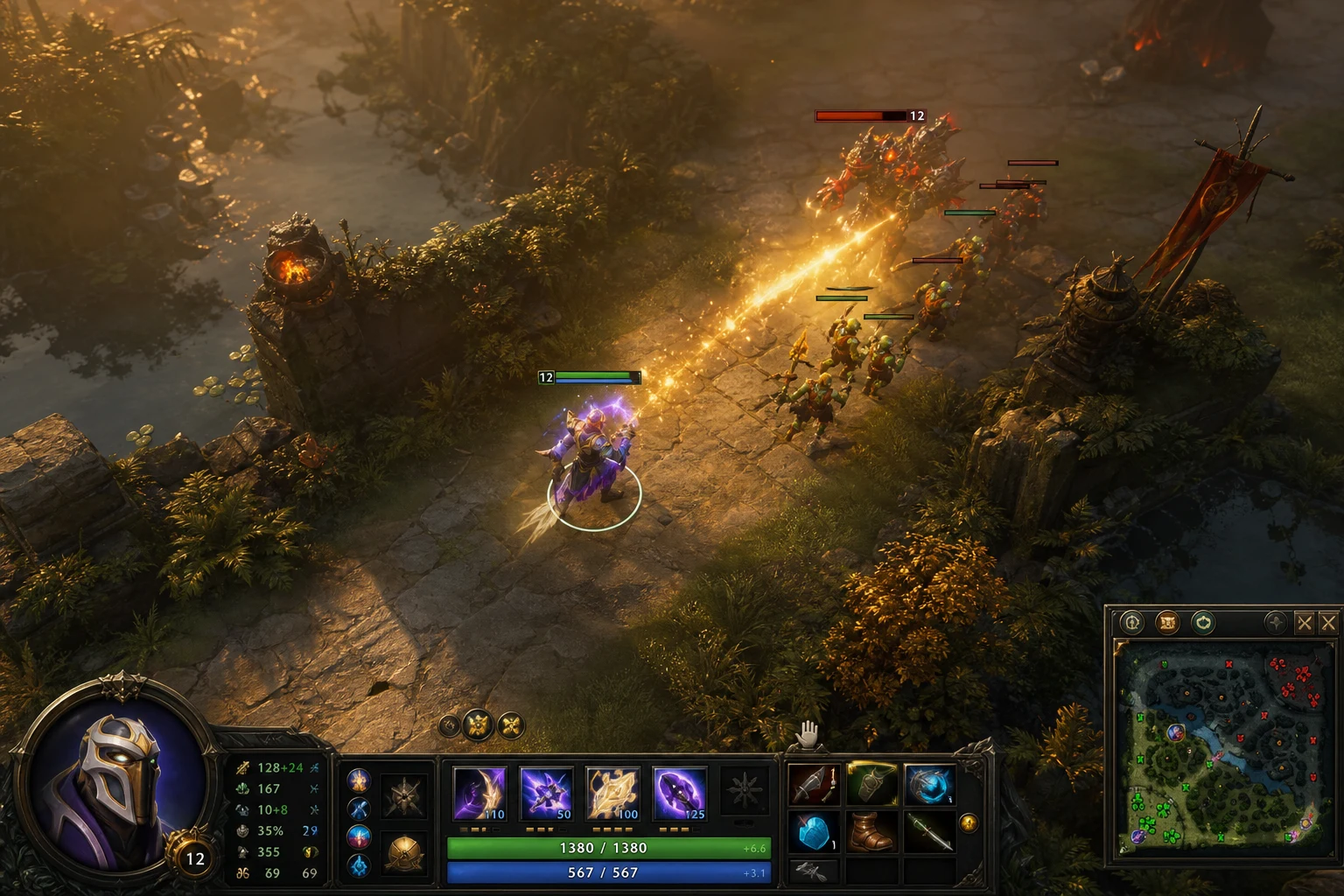
Advanced ESP solutions provide two separate visualizations: enemy icons on the minimap and 3D overlay in-game. With minimap ESP, you can read all enemy hero positions on the map at a glance. The in-game overlay creates a floating information panel above each hero: name, HP bar, mana bar, and item slots. This combination significantly increases your decision-making speed, especially in high-tempo matches.
Technical Foundations of Remaining Undetected
Dota 2's anti-cheat infrastructure consists of two layers: VAC (Valve Anti-Cheat) and the Overwatch system. VAC scans for known cheat signatures and monitors kernel-level processes. Overwatch is human review based on player reports. Different techniques are required to stay safe from both systems.
VAC Bypass: Signature Cleaning and Memory Cloaking
VAC detects cheat software through two methods: known code signatures (signature scanning) and suspicious memory reading patterns. ForceCheat's undetected ESP solutions apply signature rotation with each update cycle; the software's memory "fingerprint" is regularly changed. Additionally, memory cloaking techniques keep memory reading operations outside VAC's monitoring scope.
Avoiding Overwatch: Behavior-Based Security
The Overwatch system is evaluated by experienced players who review gameplay. Therefore, technical bypass alone isn't sufficient; behavioral security is critical. When using ESP, follow these practices: avoid "perfect" ward placements that would reveal you know the enemy's exact position, occasionally "miss" ganks instead of landing every one with 100% accuracy, and use your information advantage gradually. Consistent improvement over time attracts far less attention than sudden performance spikes.
Driver-Level and Kernel Bypass Technology
The most advanced undetected solutions operate in kernel-mode rather than user-mode. This approach completely disables VAC's process monitoring mechanisms because VAC itself runs in user-mode and cannot directly see kernel-level activities. Products like Ph Spoofer are concrete examples of this driver-level approach, providing an additional protection layer with HWID (hardware ID) masking capabilities.
Tactical Advantages Offered by Dota 2 ESP
After understanding the theoretical working principles of ESP, let's examine how this technology translates into concrete advantages in Dota 2 matches. The following scenarios demonstrate how ESP is used in real game situations.
Roshan Control and Objective Timing
Roshan, the most critical objective in Dota 2, can single-handedly determine the match's outcome. Without ESP, controlling the Roshan pit requires warding, using smoke, or taking risks. With ESP, you can instantly see all five enemy heroes' positions: if all five are on the opposite side of the map, you can safely take Roshan; if any approach the pit, you can immediately retreat and set up a counter-gank. This information is invaluable, especially during the critical late-game stages when Aegis enters the game.
Smoke Gank Countermeasures
Smoke of Deceit is Dota 2's most dangerous ganking tool because it provides minimap invisibility. However, ESP tracks enemies even under smoke. When the enemy team enters smoke, you can see which lane they're heading toward and their rotation speed, allowing you to warn your threatened teammate or set up a counter-move that forces the smoke group to retreat. This feature alone can completely change the match's flow, especially during mid-game.
Engagement Decisions Through Inventory Knowledge
Is the enemy's BKB active? Is Black Hole on cooldown? Has Refresher Orb been used? The answers to these questions directly impact teamfight decisions. ESP's inventory display feature answers these questions in real-time. By tracking BKB cooldowns and engaging with perfect timing, you can reverse an entire match's trajectory in a single teamfight.
Advantages: The Strengths of Using Dota 2 ESP
- Complete Map Vision: Completely eliminates fog of war; enemy hero positions are always visible.
- Real-Time HP/Mana Tracking: You instantly see when enemies are vulnerable and which heroes are approaching their kill threshold.
- Cooldown Monitor: Track cooldowns of lethal spells (Black Hole, Ravage, Reverse Polarity) to optimize your engagement timing.
- Inventory Transparency: Seeing enemy critical items like BKB, Blink Dagger, and Linken's Sphere fundamentally changes fight planning.
- Undetected Architecture: Regularly updated bypass technology minimizes VAC detection risk.
- Customizable Overlay: Adjust which information displays, color codes, and transparency levels to your preference.
- Low FPS Impact: The optimized overlay system minimally affects game performance; you maintain high FPS.
- Compatibility with All Heroes: Provides tactical advantage regardless of role—support, carry, or offlane.
Disadvantages: Important Considerations
- Update Dependency: Brief incompatibility may occur after Dota 2 patches; you must follow the update cycle.
- Requires Behavioral Caution: Technical bypass alone isn't sufficient; using your information advantage naturally is important.
- Installation Steps: Driver-level tools may require certain system configurations; initial setup can take some time.
- Subscription Model: Continuous updates and bypass support require periodic license renewal.
- Second Monitor Advantage: A second screen or high resolution is recommended for full overlay efficiency, though not mandatory.
Who Is This Suitable For?
Dota 2 ESP offers different value to different player profiles. The following profiles are among those who use this product most effectively:
Players Targeting Rank Advancement
Players stuck at a certain MMR threshold who want to climb ranks can achieve rapid progression with ESP's map reading advantage. Especially in the 3000-5000 MMR bracket, information superiority is one of the most critical factors directly affecting match outcomes.
Support Players
Ward placement, smoke gank coordination, and vision control form the foundation of the support role. ESP elevates all these tasks to the highest level: predicting enemy ward locations, perfectly timing smoke rotations, and warning teammates of danger becomes much easier.
Carry and Core Players
ESP's map vision is critical for optimizing farming rotations, selecting safe jungle camps, and avoiding gank pressure. Knowing your enemy jungler's position can increase your farming efficiency by 30-40%.
If you're looking for similar advantages in different games, check out our Valorant cheat category or PUBG Mobile cheat category. Comprehensive packages like GANTE Full offer similar information advantage tools for Valorant. For PUBG Mobile players, the Ph Esp product is a powerful alternative.
Installation and Initial Setup: Step-by-Step Guide
Following the correct steps when installing Dota 2 ESP for the first time directly impacts both performance and security. The following installation flow is a general guide applicable to ForceCheat products.
System Preparation
Before installation, complete these steps: temporarily disable Windows Defender and third-party antivirus software (ESP software may trigger false positives), check your Secure Boot setting in BIOS (it may need to be disabled for driver-level tools), and ensure Dota 2 is completely closed. If using HWID masking, launch a spoofer tool like Ph Spoofer before the ESP.
Overlay Configuration
Customize overlay settings on first launch. Recommended initial configuration: red color for enemy ESP / green for teammates, HP bar transparency at 70%, cooldown timer visibility enabled, inventory display enabled. For minimap ESP, keep icon size at medium level; oversized icons can make minimap reading difficult. Keeping overlay transparency between 60-75% provides an ideal balance between seeing information clearly and not obscuring game visuals.
The Difference Between ForceCheat ESP Products and Competing Solutions
Many ESP solutions exist on the market, but the gap between quality and reliability is significant. The key factors that distinguish ForceCheat are:
Update Speed and Support
Dota 2 receives frequent patches. After each major update, anti-cheat signatures can change and older ESP solutions may become detectable. ForceCheat maintains a fast patch-response update cycle; typically, an updated bypass version is ready shortly after a major Dota 2 patch is released.
Feature Richness
Beyond basic wallhack, ForceCheat ESP solutions offer advanced features like cooldown tracker, inventory display, hero health percentage, and map ESP. This feature set is either missing or sold as separate packages in most competing products.
For ESP experiences in other games, check our Best Dota 2 ESP Hack Features Comparison article, and review our How to Install Dota 2 ESP Hack? guide for installation details. For a broader perspective, our Best ESP Hacks for Dota 2 article provides valuable insights.
Conclusion
Dota 2 is a game where information is power. Seeing every corner of the map, reading your enemy's inventory, tracking cooldowns—these are all skills that normally require hundreds of hours of experience and perfect ward placement. ESP technology puts this information advantage directly in your hands and elevates your game understanding to an entirely different level.
ForceCheat's Dota 2 ESP solutions rank among the most reliable options on the market with their undetected architecture, regular update cycle, and rich feature set. The combination of wallhack, hero tracker, cooldown monitor, and inventory display sets them apart from the vast majority of competing products.
The installation process is quite straightforward when following the correct steps. Once system preparation, driver installation, and overlay configuration are complete, you'll feel the difference in your first match. Seeing smoke ganks in advance, perfecting Roshan timings, warning teammates of danger—all of this is now under your control.
As long as you follow behavioral security practices, this tool provides long-term, sustainable performance improvement. Gradual rank climbing, consistent match performance, and intelligent game decisions based on information advantage—this is exactly the value ESP delivers.
Rating: 9/10 — A powerful choice for Dota 2 players seeking map control and information advantage. The undetected performance and feature richness deserve this rating.
If you're looking for similar solutions for different games, check out our League of Legends cheat category. Current, undetected products for every platform await you in the ForceCheat catalog.
Frequently Asked Questions (FAQ)
Does Dota 2 ESP really work undetected?
ForceCheat's ESP products maintain undetected status against VAC through regularly updated bypass technology and signature rotation. However, updates should be expected after each major Dota 2 patch; using the current version is critical.
How long does ESP installation take?
Including system preparation and driver installation, approximately 15-30 minutes is sufficient for an inexperienced user. From the second installation onward, this time drops to 5-10 minutes. ForceCheat's detailed installation guides walk through the process step by step.
What Dota 2 features does ESP display?
Basic features include: enemy hero positions (including through fog of war), HP/mana percentages, active spell cooldowns, inventory contents, and minimap overlay. Advanced versions may also include ward locations and courier tracking.
What should I do to protect against HWID bans?
To minimize HWID ban risk, we recommend using a hardware ID masking tool like Ph Spoofer. This tool allows your hardware ID to be changed in case of a ban and enables opening a new account.
Does ESP work in all Dota 2 game modes?
ESP is primarily optimized for ranked and normal matchmaking modes. Turbo mode and custom lobbies are generally supported. Support for Arcade modes varies by product; check the product page before purchase.
How many accounts can I use it on simultaneously?
License terms vary by product; generally, a single-device license applies. If you want to use it on multiple accounts, usage with an HWID spoofer is recommended. For details, contact ForceCheat support.
What should I do if ESP stops working after a Dota 2 update?
If ESP stops working after a major Dota 2 patch, don't launch the software until ForceCheat completes its update cycle. Follow ForceCheat's official channels for update notifications; downloading and reinstalling the current version should resolve the issue.
Share this post
Best Dota 2 ESP Cheats: Features Comparison Guide
Dota 2 ESP Cheat Guide: Gaining Competitive Advantage
// related posts
Related Posts
Marvel Rivals Aimbot Experience: The Path to Quick Wins
Discover how aimbot and other cheat tools work in Marvel Rivals, which features will give you the edge, and how to choose the right tool for your playstyle.
October 9, 2026
Rust ESP Map Control: Seeing Enemy Positions in Advance
Master map control in Rust using ESP to see enemy positions beforehand. Discover optimal settings, profiles, and strategies for dominating the game in this comprehensive guide.
October 8, 2026
PUBG Final Circle: Best Settings and Strategies to Win
Struggling in PUBG's final circle? Master the right cheat settings and configurations to turn every endgame in your favor. Complete guide to dominating the final zone.
October 8, 2026