
Crusader · Escape From Tarkov
Installation overview
Every step comes with clear numbered actions — most setups take just a few minutes.
- 1Receive Post-Payment Information
- 2Download the Loader
- 3Extract Files
- 4Run as Administrator
- 5Enter the Key
- 6Start the Game
- 7Open the Game
- 8Complete the Injection Process
Technical Specs
- Operating system
- Windows 10, Windows 11 (21H2, 22H2, 23H2, 24H2, 25H2)
- Processor
- Intel & AMD
- Video card
- Nvidia & AMD
- Client
- Battlestate Games Launcher (BSG), Steam
Payment
Choose a plan
- Instant Delivery
- Secure Payment
- 24/7 Support
Details
Product details
Everything you need to know
Escape From Tarkov is one of the most punishing games ever made — every raid is a high-stakes gamble where one mistake ends your run. The Crusader cheat gives you the edge you need to come out on top, with a full suite of aimbot, ESP, and utility tools built specifically for Tarkov's brutal environment. If you're tired of losing your best gear to players who always seem to know exactly where you are, this is your answer.
Why Choose This Product?
Crusader is engineered for Tarkov players who want real, meaningful advantages — not just flashy features that get you banned in a week. It's actively maintained and regularly updated to stay ahead of EFT's anti-cheat, keeping your detection risk as low as possible. Whether you're a seasoned PMC or still learning the maps, Crusader adapts to your playstyle.
Key Features
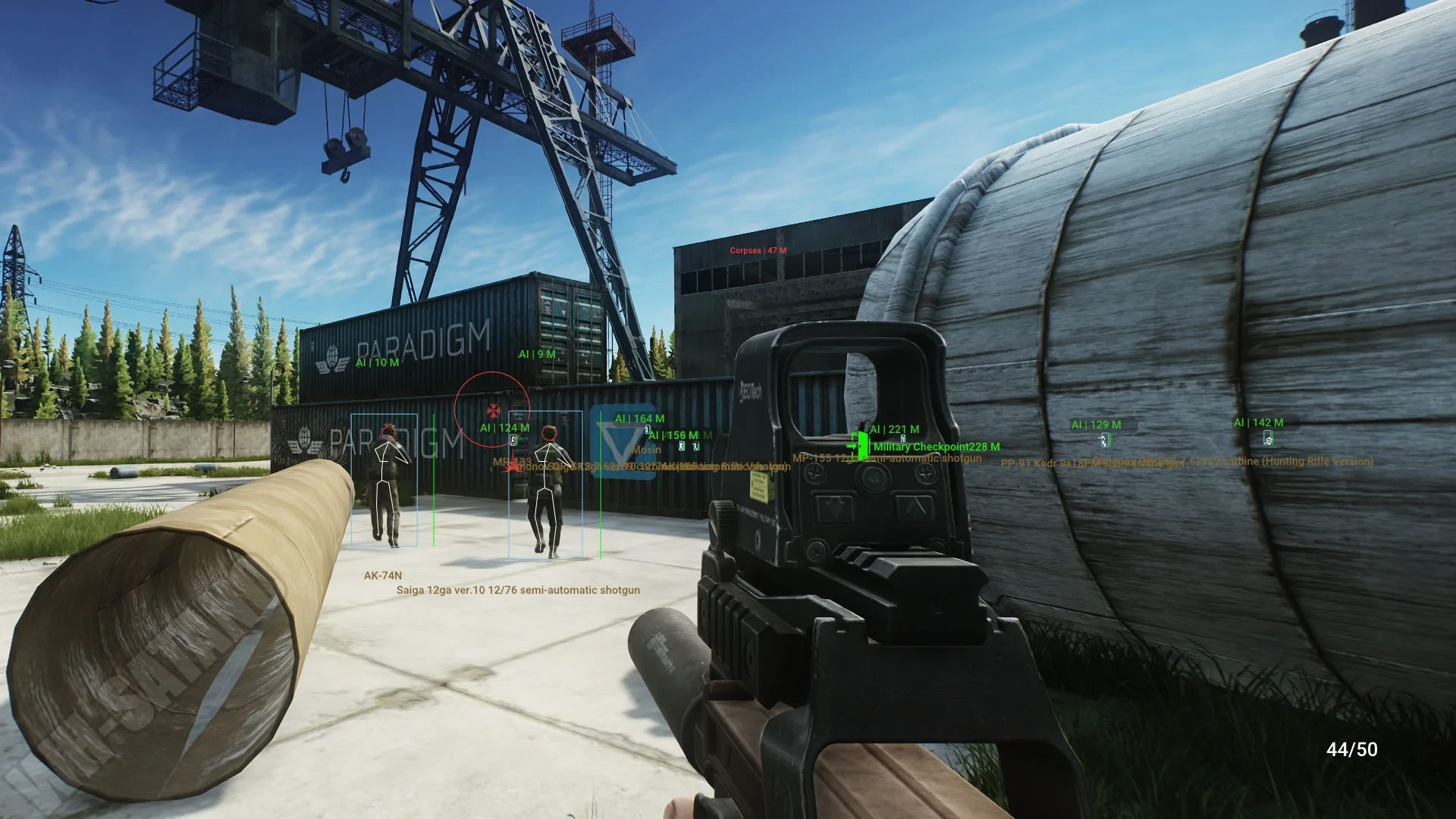
- Vector Aimbot with Human Simulation — the aimbot mimics natural mouse movement so your aim looks organic, with fully customizable FOV size, bone targeting, and a bindable activation key for total control
- Player & Skeleton ESP — see every player and bot through walls using box ESP, line ESP, or skeleton ESP, complete with name tags and real-time distance readouts in meters
- Item ESP with Flea Market Pricing — never miss valuable loot again; Crusader highlights items on the ground, shows their names, and even displays their in-game ruble value so you can prioritize what to grab
- Container ESP with Custom Icons — spot crates, bags, and stashes instantly with unique icons that differentiate container types at a glance
- Extraction Point Overlay — every available exit is marked with its name, icon, and distance, so you always know your escape route without fumbling through the map
- Grenade ESP, Night Vision & Thermal Mode — react to thrown grenades before they land, push dark corridors with night vision, or switch to thermal for a completely different tactical perspective
Setup & Usage
Getting started with Crusader is straightforward — the setup process is clean and well-documented, so you won't be spending hours troubleshooting before your first raid. Once loaded, all features are accessible through an intuitive in-game menu where you can toggle and customize everything to fit your preferences. You'll be raid-ready in minutes.
FAQ
Frequently Asked Questions
Everything you need to know before purchasing
Is there a ban risk and can I use it safely?
How long does it take to receive access after payment?
How do I install it? Is it complicated?
When does the subscription period start and how long is it valid?
Is a refund possible? What is the refund policy?
Can I use the same key or license on multiple computers?
How and when can I reach the support team?
Does the product automatically update when game updates or patches are released?
Check these out
More Escape From Tarkov cheats